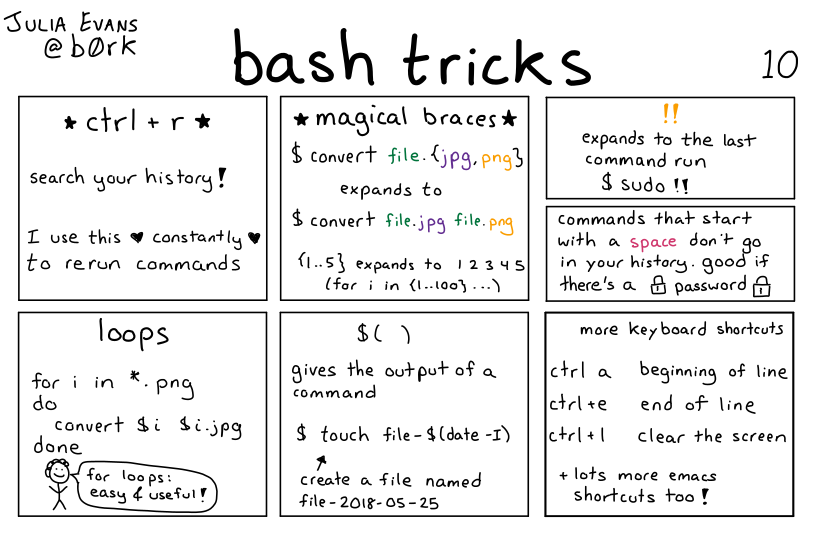
zarkanian@sh.itjust.works to Bash@lemmy.mlEnglish · 1 year agobash trickssh.itjust.worksimagemessage-square40fedilinkarrow-up1129arrow-down12
arrow-up1127arrow-down1imagebash trickssh.itjust.workszarkanian@sh.itjust.works to Bash@lemmy.mlEnglish · 1 year agomessage-square40fedilink
minus-squarezarkanian@sh.itjust.worksOPlinkfedilinkEnglisharrow-up1·1 year agoI actually prefer fish, but I want to learn more bash because is is ubiquitous and a lot of bash stuff also works in fish.
minus-squareSubArcticTundra@lemmy.mllinkfedilinkEnglisharrow-up0·1 year agoYou may also like NuShell. It’s been designed from the ground up to be an intuitive and convenient shell language.
minus-squareAlbbi@lemmy.calinkfedilinkEnglisharrow-up1·1 year agoWait, the other shells were designed to be obtuse and inconvenient? /s
minus-squareSubArcticTundra@lemmy.mllinkfedilinkEnglisharrow-up1·edit-21 year agoHaha whoops, didn’t want to imply that. I meant to say that it’s intuitive for me, who finds bash syntax cryptic.
minus-squareziggurat@lemmy.worldlinkfedilinkEnglisharrow-up0·1 year agoCan you tell me how to run a command and ignore an alias in NuShell? I don’t really use nu but when i tried to write something in it, this was something that eluded me
minus-squareSubArcticTundra@lemmy.mllinkfedilinkEnglisharrow-up3·1 year agoOh, if you want to avoid running a built in command like ls or cp and want to run the actual thing in /usr/bin, you prefix it with a ^, so eg ^cp -p.
minus-squareziggurat@lemmy.worldlinkfedilinkEnglisharrow-up1·edit-21 year agoInteresting. What does the ^ do in this situation? And I just want to not respect an alias, so falls back to either builtin or path. In zsh or bash I can prefix the command with the word command, or a backslash (directly before the command)
minus-squareSubArcticTundra@lemmy.mllinkfedilinkEnglisharrow-up1·1 year agohttps://www.nushell.sh/book/escaping.html I don’t know whether unsetting an alias is possible though. https://www.nushell.sh/book/aliases.html#replacing-existing-commands-using-aliases


I actually prefer fish, but I want to learn more bash because is is ubiquitous and a lot of bash stuff also works in fish.
You may also like NuShell. It’s been designed from the ground up to be an intuitive and convenient shell language.
Wait, the other shells were designed to be obtuse and inconvenient? /s
Haha whoops, didn’t want to imply that. I meant to say that it’s intuitive for me, who finds bash syntax cryptic.
Can you tell me how to run a command and ignore an alias in NuShell? I don’t really use nu but when i tried to write something in it, this was something that eluded me
Oh, if you want to avoid running a built in command like
lsorcpand want to run the actual thing in/usr/bin, you prefix it with a^, so eg^cp -p.Interesting. What does the ^ do in this situation?
And I just want to not respect an alias, so falls back to either builtin or path.
In zsh or bash I can prefix the command with the word command, or a backslash (directly before the command)
https://www.nushell.sh/book/escaping.html
I don’t know whether unsetting an alias is possible though.
https://www.nushell.sh/book/aliases.html#replacing-existing-commands-using-aliases