A lot of these annoyances can be disabled somewhere in the Settings, but the problem is that there are so many of them tucked away all over the place. Windows 10 (I haven’t used 11) was better than Windows 8 in terms of how unified the settings were, but I remember a few instances where I had to go rummaging through the skeletons in Windows’ closet in order to change some stuff (e.g. having to go through the old-style control panel rather than the Settings).
Furthermore, Windows has the annoying habit of changing settings after updates, and it’s an unnecessary inconvenience to have to go traipsing through the settings again and again to revert unwelcome changes. Even if it’s only the minority of settings that get changed, and if those changes aren’t too frequent, it’s still draining on one’s executive function to make your PC actually behave how you want it to. People get burnt out, and then this contributes to them struggling to find the time and brain to go through changing things.
Mostly though, I am just irked that it’s necessary to go into the settings to turn this stuff off. I am a very techy person, and thus I enjoy tinkering (or perhaps "I enjoy tinkering, and thus I am a very techy person), and stuff like this annoys me so much because I know that I’m in the minority when it comes to willingness to wrestle my tech into the shape I want it. Most people won’t go to that effort, even if it’ll only take 2 minutes — the key thing here is that many of them don’t know it’ll only take a couple of minutes, and I don’t blame them for that.
Good software needs to have sensible default settings. If that were the case, then I think we’d see more non-techy people figuring out what particular settings align with their preferences. As it stands though, configuring Windows to work in a sensible manner is a Task, and the activation energy required for that means that many won’t do it.
I know I have to turn this shit off every time, and I even have a program that reverts my settings in one click. But I still forget every damn “security update” until I notice that fucking copilot is on again. I will never, ever find it acceptable for my changes to be reverted on a regular basis. When any other program fails to keep my settings, it’s a bug and it’s a bad enough one that I usually don’t use the software. But Microsoft keeps doing it on purpose and it absolutely infuriates me that there isn’t more of a backlash.
I really wish I could get more of my stuff working in Linux to make a complete switch. I don’t even need all of it; I’ll give some stuff up.
To turn off Copilot via Group Policy Editor (gpedit.msc) go to User Configuration > Administrative Templates > Windows Components > Windows Copilot. Double-click “Turn off Windows Copilot,” set it to Enabled, and restart your computer.
I’ll give that a shot, thank you! That will alleviate the latest, greatest annoyance at least.
I’ll still have to run OOSU10 for like three dozen other settings I can’t even remember, but that’s never going to change. It shouldn’t be that hard just to keep your settings.
I really do appreciate the tip, though. I will enjoy having copilot fuck off forever.
It’s a mess of proprietary software and drivers. Some of it I hopefully can get working, it’ll just take time. I’ve had a friend suggest a windows VM before, so I’ll definitely look into Quickemu and see how much I can manage. I swear one day I shall be free!
This is the “all over the place” you’re talking about?
Furthermore, Windows has the annoying habit of changing settings after updates,
I had Windows 10 since day 1 (actually, since day -90, was test-driving it for three months before it went public release) and used Windows 11 since day 1.
Never seen any of this shit, not once.
Most people won’t go to that effort
Most people don’t see an issue and many actually utilise that feature. How do we know this? Because telemetry is a thing and MS hasn’t axed it yet.
Good software needs to have sensible default settings
“Sensible defaults” depend on the target audience. Techy people can turn all of this off, non-techy people won’t think to turn it on. That’s why, by default, it’s on.
I had Windows 10 since day 1 (actually, since day -90, was test-driving it for three months before it went public release) and used Windows 11 since day 1.
Never seen any of this shit, not once. But, again, instead of fucking around with weird scripts or registry edits, I just disabled web search and search suggestions in Settings, like a normal person.

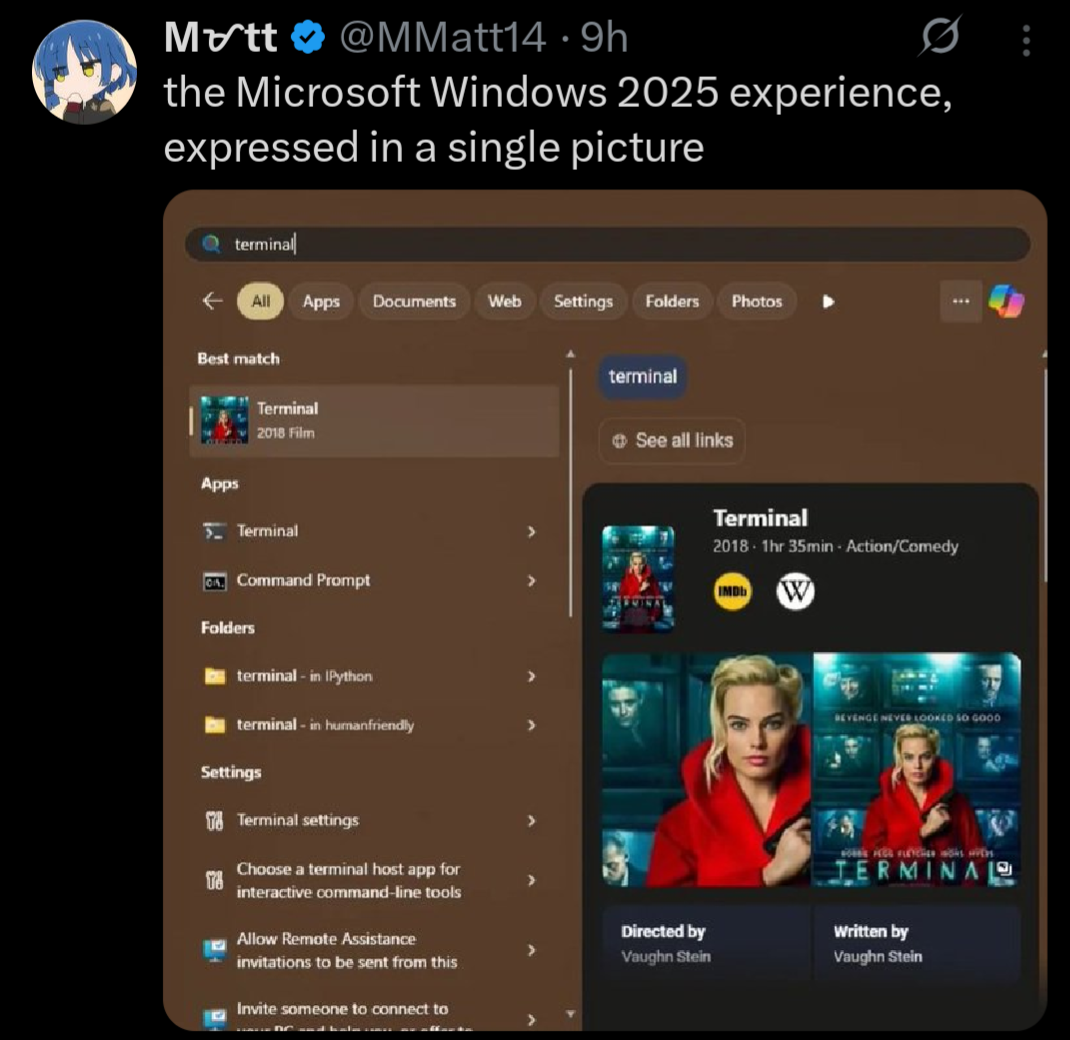
Maybe it’s my Win 11 Pro or the fact that I took 2 minutes to go to Settings and click a few toggles, but I don’t have any of this. 🤷♂️
A lot of these annoyances can be disabled somewhere in the Settings, but the problem is that there are so many of them tucked away all over the place. Windows 10 (I haven’t used 11) was better than Windows 8 in terms of how unified the settings were, but I remember a few instances where I had to go rummaging through the skeletons in Windows’ closet in order to change some stuff (e.g. having to go through the old-style control panel rather than the Settings).
Furthermore, Windows has the annoying habit of changing settings after updates, and it’s an unnecessary inconvenience to have to go traipsing through the settings again and again to revert unwelcome changes. Even if it’s only the minority of settings that get changed, and if those changes aren’t too frequent, it’s still draining on one’s executive function to make your PC actually behave how you want it to. People get burnt out, and then this contributes to them struggling to find the time and brain to go through changing things.
Mostly though, I am just irked that it’s necessary to go into the settings to turn this stuff off. I am a very techy person, and thus I enjoy tinkering (or perhaps "I enjoy tinkering, and thus I am a very techy person), and stuff like this annoys me so much because I know that I’m in the minority when it comes to willingness to wrestle my tech into the shape I want it. Most people won’t go to that effort, even if it’ll only take 2 minutes — the key thing here is that many of them don’t know it’ll only take a couple of minutes, and I don’t blame them for that.
Good software needs to have sensible default settings. If that were the case, then I think we’d see more non-techy people figuring out what particular settings align with their preferences. As it stands though, configuring Windows to work in a sensible manner is a Task, and the activation energy required for that means that many won’t do it.
I know I have to turn this shit off every time, and I even have a program that reverts my settings in one click. But I still forget every damn “security update” until I notice that fucking copilot is on again. I will never, ever find it acceptable for my changes to be reverted on a regular basis. When any other program fails to keep my settings, it’s a bug and it’s a bad enough one that I usually don’t use the software. But Microsoft keeps doing it on purpose and it absolutely infuriates me that there isn’t more of a backlash.
I really wish I could get more of my stuff working in Linux to make a complete switch. I don’t even need all of it; I’ll give some stuff up.
To turn off Copilot via Group Policy Editor (gpedit.msc) go to User Configuration > Administrative Templates > Windows Components > Windows Copilot. Double-click “Turn off Windows Copilot,” set it to Enabled, and restart your computer.
It will never toggle back on.
I’ll give that a shot, thank you! That will alleviate the latest, greatest annoyance at least.
I’ll still have to run OOSU10 for like three dozen other settings I can’t even remember, but that’s never going to change. It shouldn’t be that hard just to keep your settings.
I really do appreciate the tip, though. I will enjoy having copilot fuck off forever.
deleted by creator
It’s a mess of proprietary software and drivers. Some of it I hopefully can get working, it’ll just take time. I’ve had a friend suggest a windows VM before, so I’ll definitely look into Quickemu and see how much I can manage. I swear one day I shall be free!
deleted by creator
what apps became uninstall-able
A bar so low we need a geological survey to find it.
even a geological survey wouldn’t find it, the bar is buried below the 9 hells, right under where it’s creator will be
this is a joke plz don’t hurt me ms
Search -> Settings -> “Disable web search” + “Disable suggested apps”.
This is the “all over the place” you’re talking about?
I had Windows 10 since day 1 (actually, since day -90, was test-driving it for three months before it went public release) and used Windows 11 since day 1.
Never seen any of this shit, not once.
Most people don’t see an issue and many actually utilise that feature. How do we know this? Because telemetry is a thing and MS hasn’t axed it yet.
“Sensible defaults” depend on the target audience. Techy people can turn all of this off, non-techy people won’t think to turn it on. That’s why, by default, it’s on.
deleted by creator
I had Windows 10 since day 1 (actually, since day -90, was test-driving it for three months before it went public release) and used Windows 11 since day 1.
Never seen any of this shit, not once. But, again, instead of fucking around with weird scripts or registry edits, I just disabled web search and search suggestions in Settings, like a normal person.
how dare you not having the same experience as the picture in the ragebait article?