Admiral Patrick

I’m surprisingly level-headed for being a walking knot of anxiety.

Ask me anything.

Special skills include: Knowing all the “na na na nah nah nah na” parts of the Three’s Company theme.

I also develop Tesseract UI for Lemmy/Sublinks

Avatar by @[email protected]

  • 751 Posts
  • 6.42K Comments
Joined 3 years ago
cake
Cake day: June 6th, 2023

help-circle
  • Let me first say that I love the idea of this phone and it breaking free of the “tall, skinny rectangle” form factor. The physical keyboard is a huge draw for me as well. However, there are some things on the software side that are definitely making me wary.

    While it offers a screen for viewing and responding to messages, the Communicator doesn’t provide access to addictive social media apps or games. Instead, the company partnered with the maker of an Android launcher, Niagara Launcher, to provide access to messaging apps and productivity tools like Gmail, Telegram, WhatsApp, and Slack.

    I don’t understand why it would limit apps. $499 is a lot to spend on a secondary device, and I don’t know that I’d want to EDC two devices. That’s a lie. I know I wouldn’t want to everyday carry two phones because I did that for work and absolutely hated it.

    Most apps work fine on smaller screens. I’ve been daily driving a Cat S22 Flip with a portrait-oriented 480x640 screen for over a year, and most apps scale just fine.

    I’ve at least heard of Niagara Launcher. Is that saying the only way to use those apps is through the launcher’s integration? That sounds shitty.

    The company is teasing the possibility of integrating AI applications with this button

    Dear god, no.

    The phone’s standout feature is its Signal Light, a light-up button on the side of the device that can be customized with different colors and light patterns to indicate when you’ve received messages from certain people, groups, or app

    So, a feature that has existed for years but was taken away from us? My old OnePlus had a customizable RGB light which could be configured the same way. It was really handy, and I hated the “always on” display that replaced it. I could tell from the color and pattern what kind of notification it was without having to preview it which was nice as it didn’t stress me out with a need to reply.

    I want to like this, but it seems like they’re being very opinionated on how you actually use it. Maybe we’ll get lucky and it’ll be bootloader unlockable and LineageOS can save it from the shitty decisions of the manufacturer.

    Edit: Submitted a question/ticket to ask support. Every time a promising-looking device is announced, I always ask. The answer is usually either “What? What do you mean?” or “No”. One of these days, there will hopefully be a manufacturer that doesn’t equate Android with Google.


  • Like you’re thinking: put HAProxy on your OpenWRT router.

    That’s what I do. The HAProxy setup is kind of “dumb” L7 only (rather than HTTP/S) since I wanted all of my logic in the Nginx services. The main thing HAProxy does is, like you’re looking for, put the SPOF alongside the other unavoidable SPOF (router) and also wraps the requests in Proxy Protocol so the downstream Nginx services will have the correct client IP.

    Flow is basically:

    LAN/WAN/VPN -> HAProxy -> Two Nginx Instances -> Apps
    

    With HAProxy in the router, it also lets me set internal DNS records for my apps to my router’s LAN IP.


  • EPUB (encrypted) means you have to use their reader app or maybe Adobe Digital Editions or some other walled-garden horseshit to read it. It seems to be up to either the author or the publisher on whether to offer it DRM-free. I haven’t found much rhyme or reason, but it looks like the ones from Simon and Schuster are available without DRM about 5 years after it’s been published.

    I only buy DRM-free since I like to read on multiple devices (Kobo, Phone, or CalibreWeb in a browser in a pinch) and get tired of jailbreaking them myself. I’d gladly pay more for DRM free than not be able to read it without asking for permission every time or being locked to specific reader apps.


  • The sign of a quality meme is me feeling both attacked and validated at the same time lol. Well done.

    I do a spam sweep every morning and follow that up with a look at the modlog from overnight. If an account is actioned a lot or for some egregious things, I’ll review its profile and modlog history to see what else they’re up to and decide if that’s someone that should be kept around or given the boot.

    Honestly all admins should do that.

    Hell, half of Tesseract’s feature set was built around making it easy to do that kind of cross checking without having a bunch of tabs open or losing your original place in the app. So if you’ve ever wondered why you can do so much from the modals when you click on a user, community, or whatever, that’s why.


  • That would be cool. I didn’t dive too deep into it, but the server project for it seems like you can configure the menus any way you want since they’re just HTML. You’d probably have to do server-side rendering or otherwise put all the HA API logic in the backend, but that could work!

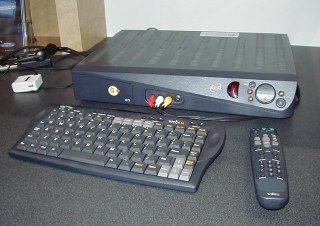
    I loooove that WeatherStar 4000 emulator and run a copy at home. It seems like it relies on Javascript so sadly may not play well with those old set top boxes. But if you get it working, please share.


  • Depends on the device.

    Some I flash LineageOS which requires an extra step to install MicroG or the Google Services. I just skip that optional step.

    Some that aren’t supported by LineageOS but are able to be rooted: I just remove / disable all the Google services and apps.

    Even on stock phones that can’t be rooted or bootloader unlocked, you can still disable things like Google Play Services. You may have to deal with and manually silence notifications saying Play Services are unavailable.

    In the latter two cases, you’ll often need to find alternative apps (like the phone dialer, SMS messenger, etc) before you can disable the built-in Google ones.